


Driving a Lexus has its perks. You have the luxurious comfort you desire in a vehicle with a smooth ride that makes your commute a relaxing affair. And, when you want a more thrilling driving experience, your Lexus powertrain delivers that effortless power-on-demand you crave. Now your Lexus comes with some of the most advanced technology available, accessible on the road or from anywhere you have cellular service through the My Lexus App. With remote connectivity, you’ll enjoy taking your Lexus ownership experience to the next level, and it’s easier than you might imagine getting started.
What Is the Lexus App?
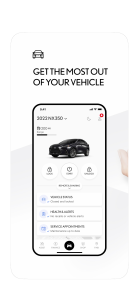
Lexus created the Lexus App, also known as Lexus Enform, to connect you with your Lexus even when you’re apart. You can take advantage of remote operating functions, access vehicle health information, and communicate with Longo Lexus’ service department from the app on your cellphone. The Lexus App’s intuitive functionality and real-time data bring you and your Lexus together to get the most from your luxury vehicle experience.
Step-by-Step Instructions To Install the Lexus App
You don’t need a software engineering degree to download and use the Lexus App. Instead, follow these simple steps, and you’ll enjoy the benefits of this new tech in a few short minutes.
Step 1: Search for the Lexus App in the App Store or Google Play.
Step 2: Download the app.
Step 3: Choose the “Sign Up” option and press “Continue.”
Step 4: Create a Lexus App account and enroll.
Step 5: You’ll receive a verification code to your email address. Enter the six-digit code to verify your account.
Step 6: Add your Lexus vehicle by entering the VIN.
Step 7: Lock all the doors on your Lexus.
Step 8: Launch the Lexus App on your cellphone.
Step 9: Press and hold the “Remote Start” button on your Lexus App for one second.
Congratulations. Your vehicle starting indicates you’ve successfully downloaded and set up your Lexus App and synced with your vehicle.
Lexus App Functions
We recommend you browse the app’s functions on your cellphone. As you explore the various remote operations, it’s important to remember that your Lexus must be parked in an area with reliable cellular service. Your Lexus communicates with the Lexus App through a unique cellular connection tuned specifically with your smart device. Think of it as a personal cell phone on wheels that only you can call.
Remote Lock/Unlock
Now you can lock or unlock your vehicle from anywhere you have a signal on your smartphone, which can come in handy.
For instance, when your friend calls and tells you that they left their wallet in your car when you went to lunch earlier and they need to retrieve it, but you’re stuck in a budget meeting. You can unlock your car without missing a line item and lock it again once they retrieve their wallet. Or perhaps you left town but have that nagging feeling that you forgot to lock your car. Open the app and check. You can lock it with a push of a button, return to your getaway, and relax.
Remote Engine Start/Stop
L.A. summers get hot, and there’s nothing worse than getting into a car that’s been baking in the sun all day. Well, you don’t have to anymore with the Lexus App. Open the app on your cell and press and hold the “Engine Start” button until the wheel starts spinning. The wheel stops when your engine starts, and your Lexus will cool down to your current climate control settings.
Or maybe you decided to hike Mt. Baldy on a cool winter’s day, parking your Lexus GX at the trailhead. You can remotely start your engine and let the interior warm up to take the chill away before you return. Lexus built in a feature to protect you against leaving your car running by mistake when using this feature. Your Lexus engine will shut off after ten minutes if you don’t arrive.
Find Your Lexus
Have you ever walked out of a mall and forgotten where you parked? Staring down row after row in a seemingly endless pattern can sink your spirits. However, using the last parked location feature on your Lexus App helps you find your vehicle in those big parking lots. If your Lexus has a good cellular connection, you can open the app and locate your car.
You can also use this function in the city. For example, say you found a great parking spot outside your client’s office but had another errand to run nearby. It’s easy to get turned around in unfamiliar territory. However, with the Lexus App, you can get walking directions to return to your car without getting lost.
Guest Driver Settings
You love your new Lexus, but you know you won’t be the only person driving it. Perhaps your wife’s Lexus needs service, or your teenage son asks to borrow the car to go out with friends. Of course, you know the valet at your favorite restaurant will drive your Lexus too. The Lexus App allows you to set driver parameters when someone else gets behind the wheel. Now, you can relinquish your keys confidently in these situations, knowing you can set limits for speed, curfew, engine run time, total driving distance, and the distance from a fixed location.
Vehicle Health Reports
The Lexus App allows you to view all your vehicle’s critical data, from oil levels and degradation to any safety recalls and upcoming maintenance. You can use the app to schedule service too. Plus, you can link your finances and make monthly payments using the app.
We hope you find this article useful if you’ve recently purchased a new Lexus and haven’t set up your Lexus App. Taking advantage of the latest technology will elevate your Lexus ownership experience to new heights. If you still have questions or need assistance setting up your Lexus App, contact our service center, and one of our friendly, knowledgeable staff will walk you through the process.
Connect with us


